

Market data subscriptions provide real-time access to the price feeds, order flow, and depth-of-market information you need to trade effectively. These subscriptions are managed through the Topstep Brokerage platform and are governed by exchange requirements set by the CME Group.
What you’re subscribing to
You can subscribe to two types of market data feeds:
- Top of Book (TOB): Shows the best available bid and ask prices at the top of the order book.
- Depth of Market (DOM): Shows multiple levels of bids and asks, giving you a fuller picture of where orders are stacking up.
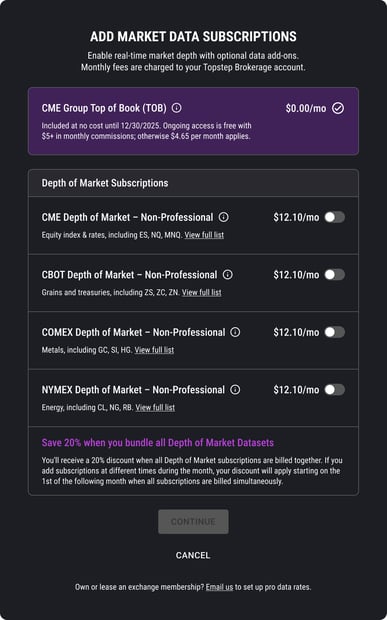
Each subscription can be selected individually or as a bundled package. It’s designed to work together, so pricing will automatically adjust for you based on your selections.
Billing and Activation
Clients of Topstep Brokerage will receive 2 months of the TOB Bundle, on us.
When you enable a TOB bundle yourself,, the system automatically checks your trading commissions from the previous month. If your commissions were $5 or more, the TOB bundle is activated at no additional charge.
The DOM Bundle: A Built-In Discount

The DOM Bundle offers a discount that rewards you for maintaining all four DOM subscriptions at once. Clients will receive a discount when purchasing all individual DOM subscriptions in a single purchase.
- If you select all four DOM subscriptions during a single session, the system will automatically apply the bundle for you. No extra steps needed.
- If you have all four individual DOM subscriptions at the start of a new month, the system applies the DOM Bundle discount automatically.
Adding, Cancelling, and Re-Activating Subscriptions
Your subscription management is handled by three simple actions:
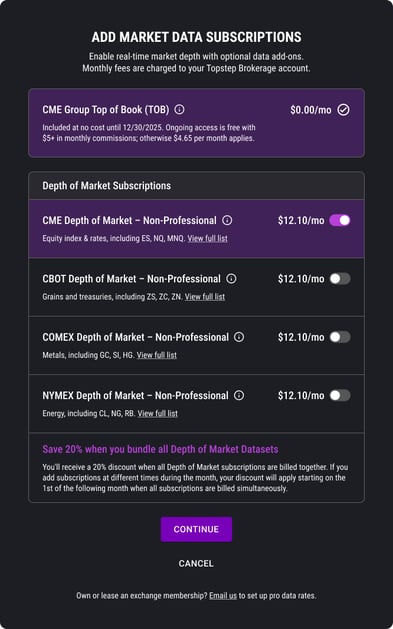
Adding a Subscription
An “Add” means you’re purchasing a subscription that isn’t currently active. Newly added subscriptions become active immediately.
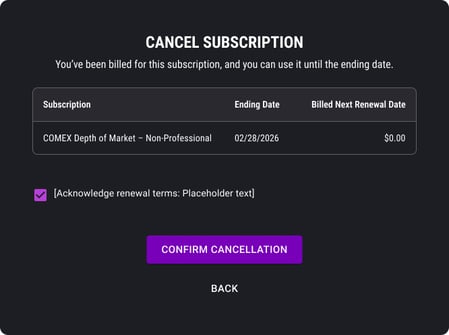
Cancelling a Subscription sets your subscription to “Ending” status. Your subscription remains active and usable through the end of the current billing month.
While a subscription is in “Ending” status, it will appear toggled off in your management screen, but you’ll still have access until the month closes.
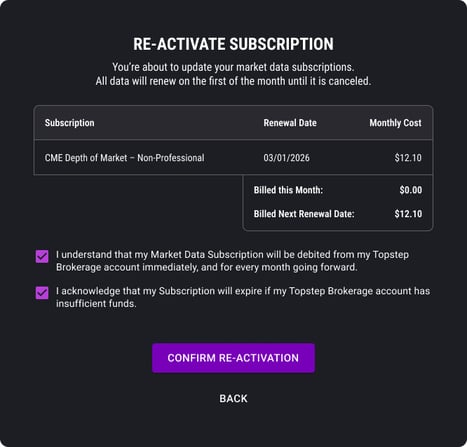
Re-Activating a Subscription
- If a subscription is in “Ending” status, you can re-activate it. This is different from adding a brand-new subscription.
- Re-activating reverses the cancellation and keeps the subscription running without a break in service.
Note: An active DOM Bundle must be cancelled before you can switch to individual DOM subscriptions. If you try to add individual subscriptions while the bundle is still active, you’ll see an error message prompting you to cancel the bundle first.
Upgrading and Downgrading
Switching between individual subscriptions and the DOM Bundle is straightforward, with a few timing rules to keep in mind:
Upgrading from Individual Subscriptions to the DOM Bundle
If you currently have 1 to 3 individual DOM subscriptions and want to upgrade to the DOM Bundle, you can add the remaining DOM subscription, and the bundle will activate from the start of the next month.
Downgrading from the DOM Bundle to Individual Subscriptions
If you have the DOM Bundle, you can cancel the specific DOM subs you do not need. Your bundle will move to “Ending” status and remain active through the end of the month.
This means continuous coverage with no gap in your data access.
Automatic Bundle Detection
If you select all four DOM subscriptions at any point, the system will automatically switch your selection to the DOM Bundle for the next month. This keeps your account optimised and prevents you from accidentally paying more than necessary.
Why This Matters
Market data subscriptions are the foundation of trading. Knowing how these rules work, especially around billing cycles and bundle discounts, means you’re never caught off guard by a charge or a gap in your data.
Key items to remember:
- Cancellations don’t cut you off immediately. You stay covered through the end of the month, giving you time to plan any changes without losing your data access mid-session.
- The DOM Bundle discount is automatic. As long as you keep all four DOM subscriptions active at the start of a new month, the system handles the savings for you.
- Every subscription change made (add, cancel, or re-activate) is initiated by you through the platform. The system applies the rules and protects your data in the background.
If you have questions about your current subscriptions or need help making a change, feel free to reach out to our Brokerage Support Team.